The Problem
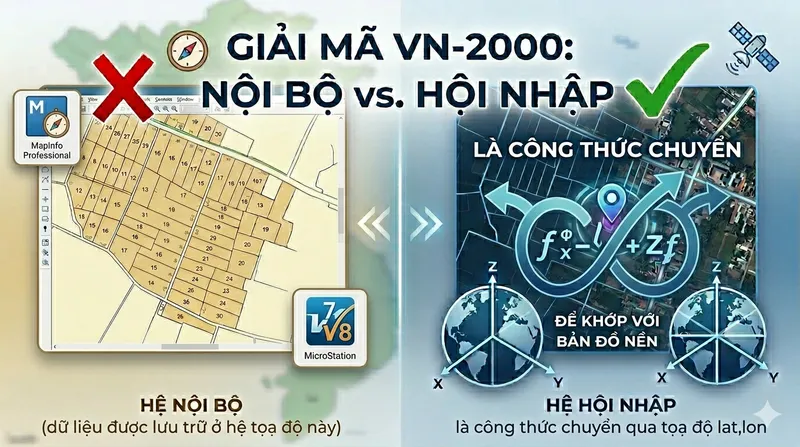
When importing MapInfo (.tab) or Microstation (.dgn) data into GeoCollect, you often see the map shift by hundreds of meters relative to the base map. This is not a software bug or GPS issue. The primary cause is confusion between two VN-2000 coordinate systems: “Internal” and “International”.
In land surveying in Vietnam, this confusion causes data to shift 200-300m when overlaid on satellite maps (Google Maps).
1. The Core: A Battle of Centers
Earth is not a perfect sphere. To draw maps, people use an ellipsoid as a reference.
- International (Geocentric): The ellipsoid center aligns with Earth’s center. This is the standard used by GPS satellites and Google Maps (WGS-84).
- Internal (Local): The ellipsoid is shifted to fit Vietnam’s terrain as closely as possible — for more accurate area and distance measurement domestically.
2. Warning When Using GeoCollect
On GeoCollect, when you load cadastral map data from MapInfo (.tab) or Microstation (.dgn) (originally in Internal system), choosing the “Coordinate System” is the make-or-break step.
The Right Choice: “VN-2000 International”
When you select this for Internal system data, you’re activating the coordinate transformation formula.
- The software takes $X, Y$ coordinates from the cadastral map, applies the 7
+towgs84parameters, and calculates correct latitude and longitude ($Lat, Lon$). - Result: Your map aligns perfectly with Google Maps.
The Wrong Choice: “VN-2000 Internal”
Many assume: “My data is cadastral (internal), so I must choose the internal system”. This is a critical mistake.
- If you choose “Internal”, the software performs no transformation (it treats datum shift as 0). It places coordinates directly on the satellite base without adjustment.
- Result: Your actual position and position on the map shift by several hundred meters. Your land parcel may “jump” to a neighboring commune or end up in the middle of a river.
3. GeoCollect Coordinate System Guide
When Importing Data
- Source data: Cadastral maps from MapInfo (.tab), Microstation (.dgn), or planning maps (usually in VN-2000 Internal - coordinates $X, Y$).
- Correct action: Choose VN-2000 International (Proj string with
+towgs84). - What happens: The software uses 7
+towgs84parameters to transform $X, Y$ coordinates to correct $Lat/Lon$ on the satellite base. - If you choose wrong: Shift of 200m - 300m from the base map.
When Exporting Data
- Data collected: Points, lines, polygons measured with GPS/RTK (essentially $Lat/Lon$ WGS-84).
- Correct action: Choose export to VN-2000 International.
- What happens: The software uses the 7 parameters to reverse-calculate from $Lat/Lon$ to $X, Y$ of the Internal system.
- Result: When you copy the file to your computer and open in MapInfo or AutoCAD, the measured points sit perfectly aligned on the existing parcel boundaries.
4. For Developers: Proj String +towgs84
The technical difference lies in the +towgs84 parameter (7 Helmert parameters). This is the mathematical formula for adjusting data from Internal system to international standard.
VN-2000 International contains the full 7 parameters:
+proj=tmerc +lat_0=0 +lon_0=104.75 +k=0.9999 +x_0=500000 +y_0=0
+ellps=WGS84 +towgs84=-191.90441429,-39.30318279,-111.45032835,
             -0.00928836,0.01975479,-0.00427372,0.252906278
+units=m +no_defs
VN-2000 Internal omits +towgs84:
+proj=tmerc +lat_0=0 +lon_0=104.75 +k=0.9999 +x_0=500000 +y_0=0
+ellps=WGS84 +units=m +no_defs
When software reads +towgs84, it understands: “This data uses a local coordinate system, use these 7 numbers to pull it to the correct position on Google Maps”. Without this line, the software assumes data is already aligned with WGS-84 — causing the hundreds-of-meters shift.
5. So When Do You Choose Internal System? (When Data Is Already “Wrong”)
In normal use of GeoCollect, we always choose International to ensure accuracy. However, there are some “peculiar” cases where you must choose Internal. That’s when your source data was already shifted from the standard from the beginning.
1. When source data has been manually “adjusted” (Forced coordinate transformation)
This is the most common case. Some map makers, when seeing data shift from Google Maps, instead of using the standard transformation formula, use the Move command to manually shift the entire map region to visually “match” the satellite image.
- Problem: At this point, the actual coordinates in the file are no longer standard VN-2000.
- Solution: If you use International system (with
towgs84formula), the software will perform another shift, causing double-shift misalignment. At this point, you must choose Internal (no parameters) to keep the “already adjusted” position.
2. When data was exported from old/buggy software
Some legacy software or unofficial conversion tools often omit the 7 datum shift parameters.
- Problem: Data exported from these tools defaults to treating Vietnam’s center as aligned with the world center (WGS-84).
- Solution: If you load this file into GeoCollect and choose International, it will be wrong. You need to choose Internal so the app reads the data correctly according to the original “wrong” source file, so it can display properly.
3. When you want to “align” with other mismatched data layers
If your organization owns an archive of old data where everything is shifted by the same 300m, and you don’t have time to re-standardize everything:
- At this point: Choosing Internal for both Import and Export will help these data layers stack perfectly on each other in the App (even though all of them are in the wrong position relative to real-world).
Advice
- Internal system is only a “firefighting measure” for non-standard data.
- If you choose Internal and still see the map shift from the GPS position you’re standing at, it means your data is standard VN-2000. At that point, immediately switch back to International.
Summary: Only choose Internal when you are certain your data has been “processed separately” or when you accept that the map won’t match the field to prioritize matching other older maps.
Summary
| Your data | Goal | Choose on GeoCollect |
|---|---|---|
| Cadastral/planning map | Import into GeoCollect to view on satellite | VN-2000 International |
| GPS data collected from field | Export from GeoCollect to MapInfo/AutoCAD | VN-2000 International |
“International” is the formula — “Internal” is the raw data.
Don’t let the naming fool you. Always choose International (with toWgs84) in both Import and Export directions on GeoCollect.