Introduction
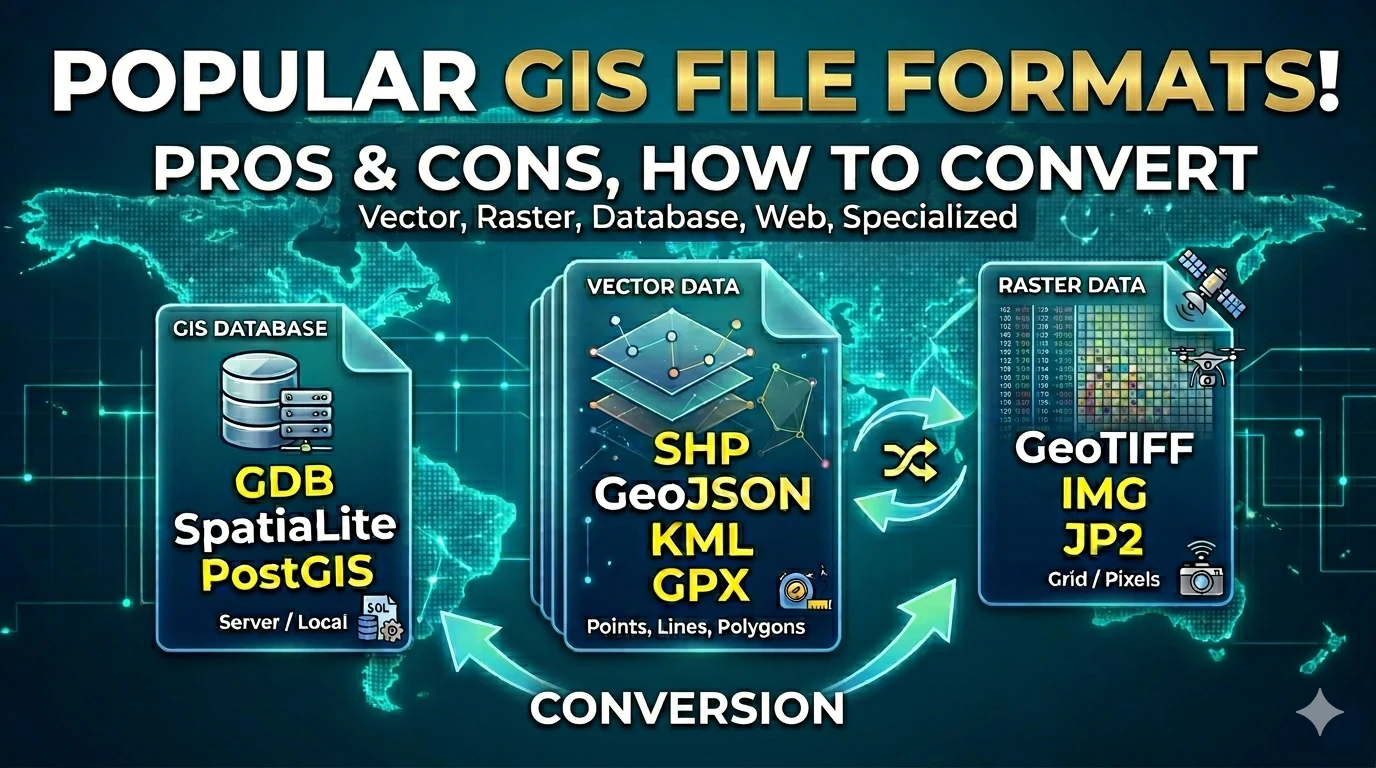
Working with GIS means working with a wide variety of file formats. Each format was designed for a specific purpose, with its own strengths and limitations. Understanding them helps you choose the right tools, avoid data loss, and integrate systems more effectively.
This article classifies and explains the most common GIS file formats, organized by category: vector, raster, databases, web, and specialized formats.
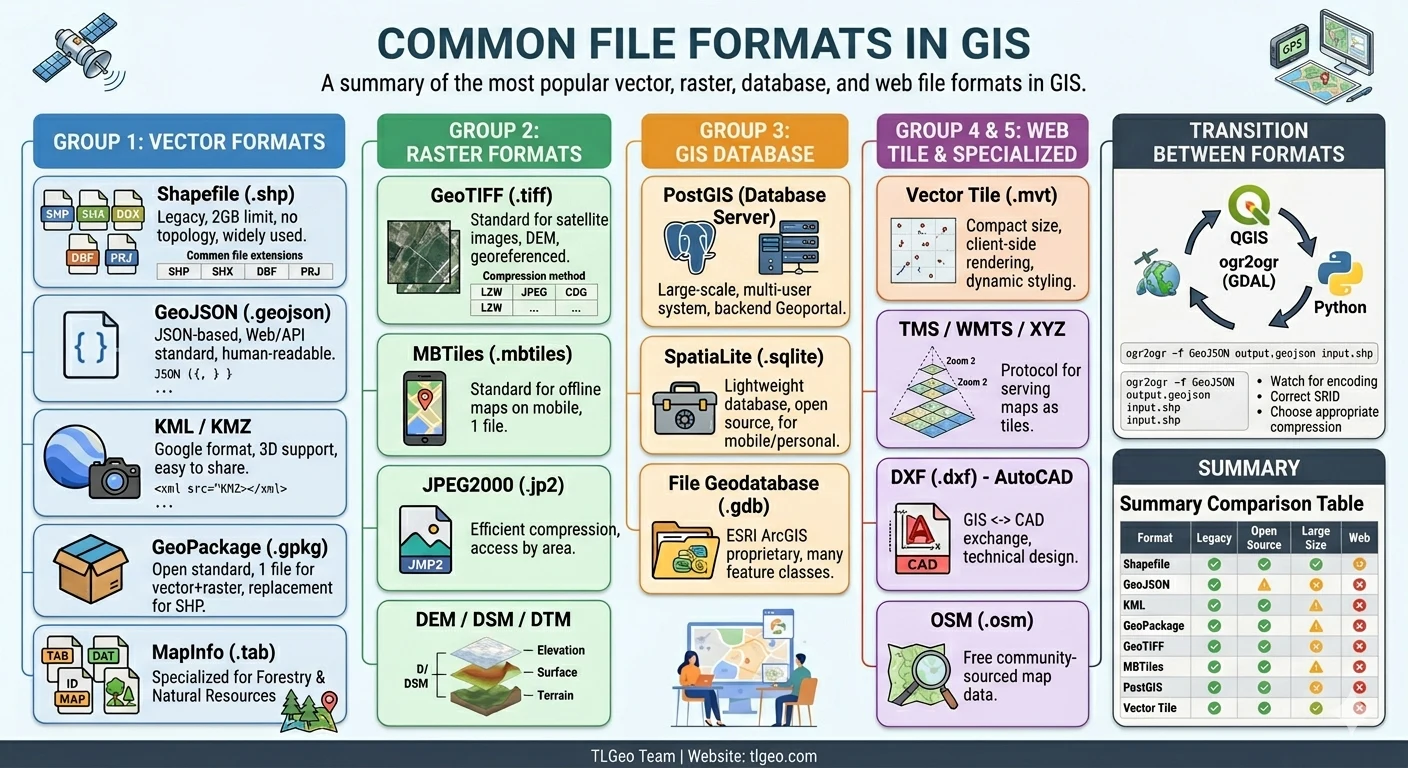
Group 1: Vector Formats
Vector data represents geographic objects through points, lines, and polygons — with associated attributes.
1.1. Shapefile (.shp)
Shapefile is a vector format developed by ESRI in 1998, once the universal “common language” of GIS.
File structure (multiple companion files):
my_data.shp       ← Geometry data (required)
my_data.shx       ← Position index (required)
my_data.dbf       ← Attribute table (required)
my_data.prj       ← Coordinate system info
my_data.sbx       ← Spatial index
my_data.cpg ← Character encodingAdvantages:
- Widely supported — nearly every GIS software can read it
- Simple, easy to share
- Small file size
Disadvantages:
- 2 GB size limit per file
- Field names limited to 10 characters
- No DateTime data type, limited Unicode support
- Does not store topology (spatial relationships)
- Actually multiple files — easy to miss pieces when sharing
Use when: Exchanging data between different systems, simple data, small-scale projects.
1.2. GeoJSON (.geojson / .json)
GeoJSON is a JSON-based text format, designed for web and APIs.
Example structure:
{
  "type": "FeatureCollection",
  "features": [
    {
      "type": "Feature",
      "geometry": {
        "type": "Point",
        "coordinates": [105.8342, 21.0278]
      },
      "properties": {
        "name": "Hanoi",
        "population": 8000000
      }
    }
  ]
}Advantages:
- Human-readable (plain text)
- Easy web/JavaScript integration
- Full Unicode support
- No size limit
Disadvantages:
- Larger file size than Shapefile
- No compression by default
- Less desktop GIS software support for direct editing
Use when: Web mapping (Leaflet, Mapbox, Google Maps), APIs, open data.
1.3. KML / KMZ (.kml, .kmz)
KML (Keyhole Markup Language) — the format of Google Earth/Google Maps. KMZ is the compressed (zipped) version of KML.
Example structure:
<?xml version="1.0" encoding="UTF-8"?>
<kml xmlns="http://www.opengis.net/kml/2.2">
  <Placemark>
    <name>Hanoi</name>
    <Point>
      <coordinates>105.8342,21.0278</coordinates>
    </Point>
  </Placemark>
</kml>Characteristics:
- Closely tied to Google Earth / Maps
- Supports 3D (Camera, Model)
- Easy to create, easy to share with non-technical users
- Rich metadata (style, description, Timespan)
Disadvantages:
- Not a fully open standard (maintained by Google)
- Only supports WGS84 coordinate system directly
- Slow to process with large files
Use when: Presentations, sharing with non-technical users, combining with Google Earth.
1.4. GPX (.gpx)
GPX (GPS Exchange Format) — an open standard for GPS data.
<?xml version="1.0" encoding="UTF-8"?>
<gpx version="1.1">
  <trk>
    <name>Hiking Trail</name>
    <trkseg>
      <trkpt lat="21.0278" lon="105.8342">
        <ele>12</ele>
        <time>2026-04-05T08:00:00Z</time>
      </trkpt>
    </trkseg>
  </trk>
</gpx>Characteristics:
- Stores waypoints, routes, and track logs
- Integrates elevation and timestamp
- Supported by most GPS devices and field data collection apps
Use when: Field GPS data collection, apps like Geocollect export, Garmin, Strava.
1.5. GeoPackage (.gpkg)
GeoPackage is an open standard from OGC (Open Geospatial Consortium), stored in a SQLite database.
Advantages:
- Single file containing everything (vector, raster, metadata, styles)
- No size limits
- Supports topology, topology rules
- Designed as Shapefile’s successor
Disadvantages:
- Less software support compared to Shapefile
- More complex read/write operations
Use when: Projects needing a single file, storing both vector + raster, open standard compliance.
1.6. MapInfo (.tab / .dat / .id / .map)
MapInfo TAB is a vector format from MapInfo Corporation (now part of Precisely), widely used in Vietnamese forestry and natural resource management.
File structure (4 companion files):
VN_Rung.tab     ← Map structure definition
VN_Rung.dat     ← Attribute data
VN_Rung.id      ← Link index
VN_Rung.map ← Geometry dataAdvantages:
- Widely used in forestry, land planning, and environmental management in Vietnam
- Strong attribute table management (table linking, SQL queries)
- Compatible with government agencies (Forestry Departments, Forest Management Boards)
- Well-supported in forestry-specific software
Disadvantages:
- Also consists of multiple companion files — easy to lose pieces when sharing
- MapInfo proprietary (though open-source libraries can read it)
- Less common outside forestry / natural resources sectors
Use when: Forestry data, forest boundaries, land-use maps, data exchange with Vietnamese government agencies.
Group 2: Raster Formats
Raster data represents surfaces as a grid of cells (pixels), where each pixel carries a value (temperature, elevation, reflectance…).
2.1. GeoTIFF (.tiff / .tif)
GeoTIFF is an extended TIFF image format that embeds georeference information in metadata.
Characteristics:
- Stores satellite imagery, aerial photography, DEMs
- Contains coordinate, projection, and datum information
- Supports compression (LZW, JPEG, LZ77, ZSTD…)
- Supports multiple channels (bands) — multispectral, hyperspectral
Common raster compression methods:
| Method | Compression Ratio | Lossy |
|---|---|---|
| None | 1x | No |
| LZW | ~2-3x | No |
| Deflate | ~2-3x | No |
| JPEG | ~10-20x | Yes |
| ZSTD | ~3-5x | No |
| COG (Cloud Optimized) | Varies | No |
Use when: Satellite imagery, DEMs, GIS background images, the universal “common language” for raster.
2.2. ERDAS Imagine (.img)
A specialized raster format from Hexagon Geospatial (ERDAS IMAGINE).
Characteristics:
- Full multispectral and hyperspectral support
- Rich metadata for remote sensing
- Professional raster processing
Use when: Advanced remote sensing analysis, satellite image processing.
2.3. JPEG2000 (.jp2)
A next-generation compression format, more efficient than traditional JPEG.
Characteristics:
- Lossy or lossless compression
- Region-based access (progressive decoding) — fast loading on the web
- Wavelet transform compression
Use when: Satellite imagery transmitted over networks, large-area storage.
2.4. MBTiles (.mbtiles)
MBTiles stores 256x256 pixel raster/map tiles in SQLite.
Characteristics:
- Single file — easy to copy, move
- Supported by most mobile apps (Geocollect, Mapbox, TileMap…)
- Standard for offline maps
Use when: Offline maps, mobile applications, sharing tile sets.
2.5. DEM / DSM / DTM
| Format | Description |
|---|---|
| DEM | Digital Elevation Model — bare earth elevation |
| DSM | Digital Surface Model — elevation including objects (trees, buildings) |
| DTM | Digital Terrain Model — ground elevation, objects removed |
Common formats: GeoTIFF, ASCII Grid (.asc), FLT, UTM
Group 3: GIS Databases
3.1. File Geodatabase (.gdb)
FileGDB is ESRI’s database format (stored as a folder containing multiple files).
Characteristics:
- Stores multiple feature classes, rasters, tables in one folder
- Supports topology, relationship classes, network datasets
- No size limits (unlike Shapefile)
- Fully readable only on ArcGIS
Disadvantages:
- ESRI proprietary
- Complex structure
3.2. SpatiaLite (.sqlite / .spatialite)
SpatiaLite = SQLite + spatial support. A lightweight, open-source GIS database.
Characteristics:
- Single database file — easy to backup, share
- Spatial SQL queries (ST_* functions)
- Free, open-source
- Works well on mobile (QGIS, apps)
Use when: Medium and small projects, lightweight database needs, QGIS + web stack.
3.3. PostGIS (Database Server)
PostGIS is a spatial extension of PostgreSQL — a relational database with GIS capabilities.
Characteristics:
- Server-based — multiple concurrent users
- Powerful spatial queries (spatial joins, routing…)
- Supports raster, topology, 3D
- Often used as backend for Geoportal, GeoCloud
Use when: Large projects, multi-user environments, web GIS backend, Geoportal.
Group 4: Web / Tile Formats
4.1. Tile Map Service (TMS) / WMTS
TMS serves maps as a tile pyramid — dividing maps into 256x256 pixel tiles at multiple zoom levels.
z=5/x=17/y=10.png ← Zoom 5, column 17, row 10Comparison:
| Protocol | Characteristics |
|---|---|
| TMS | OGC open standard |
| WMTS | OGC, supports REST & KVP |
| XYZ | De facto standard (slippy map) |
4.2. Vector Tile (.mvt / .pbf)
Vector Tile stores vector data (points, lines, polygons) as Protobuf (MVT) — compact, client-side rendered.
Advantages:
- Much smaller file size than raster tiles
- Dynamic styling — change colors, labels without regenerating tiles
- Smooth zoom in/out
Use when: High-performance web maps (Mapbox, MapLibre, OpenLayers 3+).
Group 5: Specialized Formats
5.1. DXF (.dxf) — AutoCAD
DXF (Drawing Exchange Format) is AutoCAD’s format.
- GIS ↔ CAD data exchange
- Supports complex 2D, 3D objects
- No projection information in the file
Use when: Engineering drawings, urban planning, infrastructure.
5.2. OpenStreetMap (.osm)
OSM is the native format of OpenStreetMap.
- Stores global maps, community-contributed
- XML or PBF (Protobuf compressed) format
- Can be imported into PostgreSQL/PostGIS
Use when: Free base data, creating base maps, research.
5.3. GML (.gml) — Geography Markup Language
GML is OGC’s markup language, an XML format for spatial data.
- Open standard, used for system-to-system data exchange
- Complex, verbose
Use when: Data exchange following INSPIRE standards (EU), WFS (Web Feature Service).
Quick Comparison Table
What does the “Web” column mean? — Whether the format can be served directly on the web (browser) without GIS desktop software. ✅ = supported, ❌ = not supported, ⚠️ = limited.
| Format | Type | Open Source | Large Size | Web |
|---|---|---|---|---|
| Shapefile | Vector | Open | ⚠️ 2GB limit | ❌ |
| GeoJSON | Vector | Open | ⚠️ Large files | ✅ |
| KML/KMZ | Vector | ✅ | ✅ | |
| GPX | Vector | Open | ✅ | ✅ |
| GeoPackage | Vector+Raster | Open | ✅ | ⚠️ |
| MapInfo TAB | Vector | MapInfo | ✅ | ❌ |
| GeoTIFF | Raster | Open | ✅ | ✅ (COG) |
| MBTiles | Raster Tile | Open | ✅ | ✅ |
| FileGDB | DB | ESRI | ✅ | ❌ |
| SpatiaLite | DB | Open | ✅ | ⚠️ |
| PostGIS | DB Server | Open | ✅✅ | ✅ |
| Vector Tile | Tile | Open | ✅ | ✅✅ |
TLGeo products like Geocollect support importing and exporting most of these formats. See details: Which formats does Geocollect support?
How to Convert Between Formats
Popular tools
-
QGIS: Supports nearly all formats, convert via “Save As…”
-
ogr2ogr (GDAL): Batch conversion, command line
# Shapefile → GeoJSON ogr2ogr -f GeoJSON output.geojson input.shp # GeoJSON → GeoPackage ogr2ogr -f GPKG output.gpkg input.geojson -
Python (geopandas, rasterio): Automate workflows
-
GeoConverter (web): Quick online conversion
Important notes
- Shapefile → GeoJSON: Check character encoding (UTF-8)
- GeoPackage: Ensure correct SRID after conversion
- MapInfo ↔ Shapefile: Use ogr2ogr for direct conversion
- Raster: Choose appropriate compression (high compression → quality loss)
- Topology: GeoPackage and PostGIS preserve topology; Shapefile does not
Conclusion
There is no single “best” format — each suits a different context:
- Simple sharing → Shapefile (most widely recognized)
- Web / API → GeoJSON, Vector Tile
- Lightweight database → SpatiaLite, GeoPackage
- Large, multi-user database → PostGIS
- Satellite imagery raster → GeoTIFF (COG)
- Offline mobile maps → MBTiles
- Forestry & government agencies (Vietnam) → MapInfo TAB
💡 Tip: Use Geocollect to collect field GPS data — the app supports exporting to multiple formats: GeoJSON, KML, GPX, DXF — fitting most GIS software and workflows.
If you need advice on choosing the right file format for your project, feel free to contact TLGeo for consultation.