3. Data Search Panel
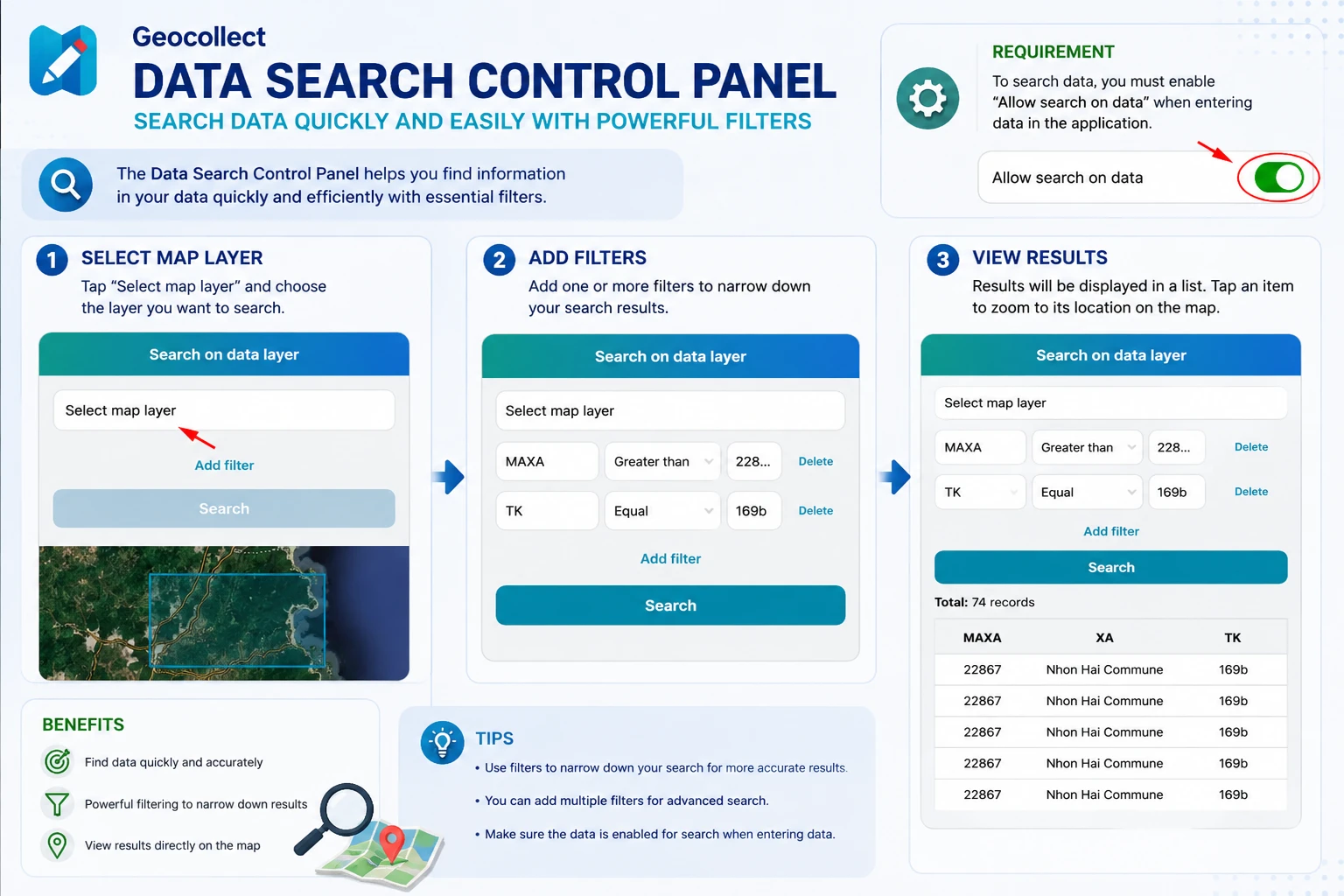
The data search panel helps users search for data quickly and easily through customizable filters.
Conditions for Data Search
For data to be searchable on the app, when entering data into Geocollect, users need to enable the option:
Allow search on data
This option is located in the layer information section.
Data Search Steps
Step 1: Open the Data Search Panel
From the map screen, open the function:
Search on data layer
After opening, the search screen will display a list of layers that support search.
Step 2: Select the Map Layer to Search
Click on:
Select map layer
Then select the data layer you want to search.
Examples:
- Forest status data
- Cadastral data
- Field survey data
- Other GIS layers imported into the app
Step 3: Add Search Filters
After selecting the data layer, users can add filter conditions using the button:
Add filter
Each filter includes:
- Data field name
- Search condition
- Value to search
Examples:
- MAXA > 22867
- TK = 169b
Users can add multiple filters simultaneously to increase search accuracy.
Step 4: Perform Search
After configuring the filters, click the button:
Search
The app will display:
- Total number of records found
- List of data matching the filter conditions
Users can quickly view data attributes directly in the results table.
Search Results
After successful search:
- Matching records will be displayed in a list
- Users can view attribute information for each object
- Corresponding data will also be displayed on the map
This feature is particularly useful when working with:
- Cadastral data
- Forest inventory data
- Field survey data
- Large GIS datasets
Notes
- Only data layers that have enabled Allow search on data option will appear in the search list.
- The more detailed the search filters, the more accurate the results.
- Multiple conditions can be combined to filter complex data.
- Search speed depends on the amount of data on the device.